
Whether you’re just starting to write a new application, trying to untangle the mess of a year-long project or just simply looking for a neat trick that can help you get your automation to another level — here’s something that I have spent many hours on and wanted to share with the world ;)
The whole source code is available here if you want just an answer that works https://github.com/RelappsStudio/gradle-tricks/blob/main/core_app/android/app/build.gradle.kts
Please note that the repository contains the code that already supports Gradle.kts as this is the current standard for Android development. If your project still uses groovy, consider migration. For more information visit: https://developer.android.com/build/migrate-to-kotlin-dsl
With all this behind us let’s dive deep into the source of the problem and the solution. Remember to run all **gradlew** commands in android folder of your app ;)
The problem
The knowledge of what and how many packages are inside your app is a necessity. With plugins importing plugins importing plugins to create an unholy pyramid of dependencies and with increasingly more demanding Play Store rules it is crucial to have an absolute overview over your product.
Adding to that the concern that may come from having separate flavors or even multiple applications in one codebase? One must be certain that no unnecessary bloat spills over, which can often prove difficult due to complexity of the project.
The simple solution
The first answer to “how should I keep track of all dependencies” would be to use gradlew. More precisely:
$ ./gradlew gradlew app:dependencies -- configuration <yourRuntimeClasspath>The output will be a dependency tree in terminal (or in textfile if you add > deps.txtto the command)
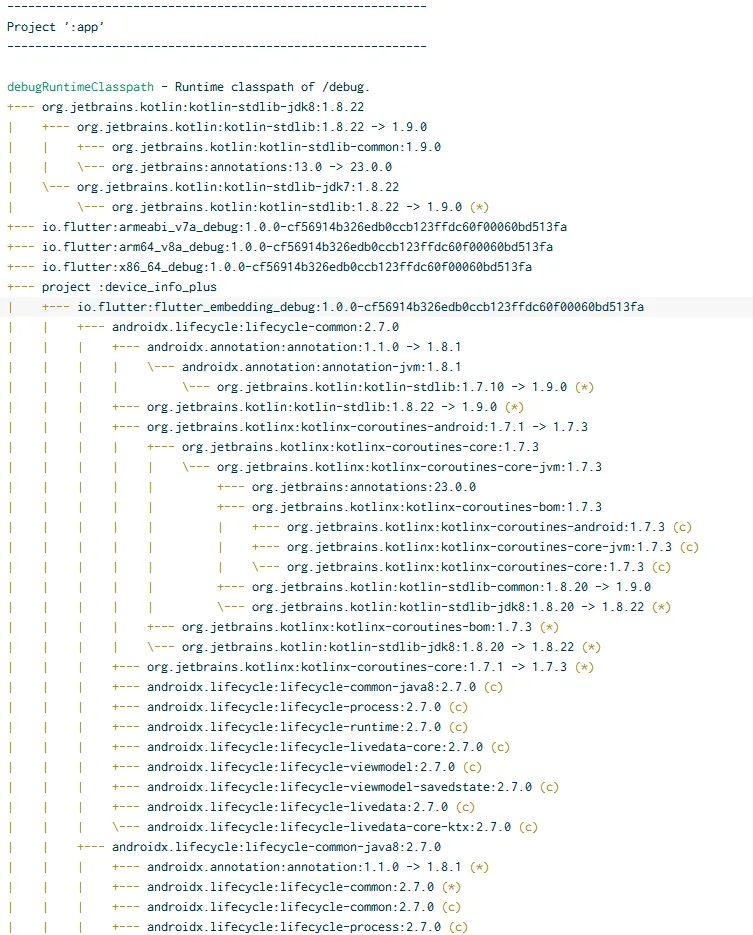
Notice how transitive dependencies are included. To find only direct dependencies look for keyword project before package identifier.
You can even pass additional param to this command --scan to publish your scan results to Develocity, where you can share results or just browse them in a prettier and easier to digest environment than terminal or plain text file. You can check out the sample output of develocity summary for this project. You should be able to quickly navigate & identify all direct dependencies of that project from the dashboard.
If you’re curious how to find correct configuration you can always refer to the output of your last build or create a small task for yourself in Gradle (android/app) that will let you display all available configurations for your project, like so:
tasks.register("listConfigurations") {
    doLast {
        configurations.forEach {
            println(it.name)
        }
    }
}
Then if you type gradlew listConfigurations > configs.txt you will get a text file showing you all possible configurations. For inspecting a production application you need to look at available items ending with “runtimeClasspath” name. Though there will be many many more available. You can learn more about them and dependency naming here — https://developer.android.com/build/dependencies
This is the easy part done, but to create an ultimate automation that will always do a dependency summary during build of your app we need to split the process into clear steps, starting with the variables.
The heavy solution
This solution is more useful, especially for large projects but can also scale up with your starter project. It will keep working no matter how complex your code structure will get along the way.
If you want everything to be pretty and modular we need to slow down and touch grass for a second. Open your gradle method in android/app/build.gradle.kts.
android.applicationVariants.all {
// Define your build/flavor name e.g., debug/profile/release or premiumDebug/freemiumDebug
    val variantName = name //Taken from active build
    val capitalized = variantName.replaceFirstChar { if (it.isLowerCase()) it.titlecase() else it.toString() }
// Taskname is dynamic, based on build/flavor
    val taskName = "list${capitalized}Dependencies"
    val configName = "${variantName}RuntimeClasspath" //Use RuntimeClasspath for full scan of app or change to see results for other configs
//Register task with dynamic name you just created
    tasks.register(taskName) {}
}
As for the task itself this is how it looks like:
tasks.register(taskName) {
        group = "Reporting"
        description = "Lists dependencies for the $variantName build variant"
//Check if the configuration you're trying to access is valid. Just to be super sure
        doLast {
            val config = configurations.findByName(configName)
            if (config == null) {
                println("Configuration '$configName' not found.")
                return@doLast
            }
//Prepare your file and build directory
            val outputFile = File(buildDir, "dependency-report-$variantName.txt")
            outputFile.parentFile.mkdirs()
///The dependencies at this stage may not be fully resolved, prepare a bucket to catch them (realistically should not happen but who knows)
            val unresolved = mutableListOf<String>()
            outputFile.bufferedWriter().use { writer ->
                writer.appendLine("Dependencies for configuration: $configName")
//In all deps if they're resolved, write them to file
                config.incoming.resolutionResult.allDependencies.forEach { dep ->
                    when (dep) {
                        is ResolvedDependencyResult -> {
                            val selected = dep.selected
                            val group = selected.moduleVersion?.group ?: "unknown-group"
                            val name = selected.moduleVersion?.name
                            val version = selected.moduleVersion?.version ?: "unspecified"
                            writer.appendLine(" - $group:$name:$version")
                        }
//Catch unresolved deps and make note of it in the file
                        is UnresolvedDependencyResult -> {
                            val attempted = dep.attempted
                            unresolved.add(attempted.displayName)
                            writer.appendLine(" - [UNRESOLVED] ${attempted.displayName}")
                        }
                    }
                }
                if (unresolved.isNotEmpty()) {
                    writer.appendLine("\n[!] WARNING: Some dependencies could not be resolved:")
                    unresolved.forEach { writer.appendLine(" - $it") }
                }
            }
//Notify that process is finished
            println("Dependency report for $variantName written to: $outputFile")
        }
    }
and now to top it all off add a hook that will bind that task to the build process. The whole method should look like this:
android.applicationVariants.all {
    val variantName = name
    val capitalized = variantName.replaceFirstChar { if (it.isLowerCase()) it.titlecase() else it.toString() }
    val taskName = "list${capitalized}Dependencies"
    val configName = "${variantName}RuntimeClasspath"
    tasks.register(taskName) {
        group = "Reporting"
        description = "Lists dependencies for the $variantName build variant"
        doLast {
            val config = configurations.findByName(configName)
            if (config == null) {
                println("Configuration '$configName' not found.")
                return@doLast
            }
            val outputFile = File(buildDir, "dependency-report-$variantName.txt")
            outputFile.parentFile.mkdirs()
            val unresolved = mutableListOf<String>()
            outputFile.bufferedWriter().use { writer ->
                writer.appendLine("Dependencies for configuration: $configName")
                config.incoming.resolutionResult.allDependencies.forEach { dep ->
                    when (dep) {
                        is ResolvedDependencyResult -> {
                            val selected = dep.selected
                            val group = selected.moduleVersion?.group ?: "unknown-group"
                            val name = selected.moduleVersion?.name
                            val version = selected.moduleVersion?.version ?: "unspecified"
                            writer.appendLine(" - $group:$name:$version")
                        }
                        is UnresolvedDependencyResult -> {
                            val attempted = dep.attempted
                            unresolved.add(attempted.displayName)
                            writer.appendLine(" - [UNRESOLVED] ${attempted.displayName}")
                        }
                    }
                }
                if (unresolved.isNotEmpty()) {
                    writer.appendLine("\n[!] WARNING: Some dependencies could not be resolved:")
                    unresolved.forEach { writer.appendLine(" - $it") }
                }
            }
            println("Dependency report for $variantName written to: $outputFile")
        }
    }
    // Hook into variant build
    assembleProvider.configure {
        dependsOn(taskName)
    }
}
Congratulations! Now you have your dependency summary combined with your app build. Now instead of boring old output such as

You have an amazing new output with each build looking like

Now regardless if you’re running your app build locally or in pipeline, you can easily export this summary, create more automation to verify that nothing changed when you weren’t looking, or create comprehensive difference summaries between your app flavors to make absolutely sure your architecture is rock-solid.