Introduction
While we all wish for a world where we could trust every app, the risk of you or your users getting infected with malware is still high.
According to a 2024 report by Kaspersky the average quarterly number of downloaded malware is above 300 000. With the most common category of viruses being AdWare — used for displaying unwanted ads and stealing advertising data from user. Seconded by RiskTools — remote access or hardware monitoring tools. Followed by various types of trojans.
To explain why I want to focus specifically on Android side of the story let me introduce a few statistics:
- Between mobile operating systems out of all available malware 95% targets Android (via spacelift)
- 47% of all free Android antivirus programs available were found to be unable to detect any form of dangerous malware. (via worth)
- Over 331 apps available via the Google Play Store with more than 60 million downloads were found to be viruses (via BitDefender)
Now we should also be aware that Google is making Play Store a better place by introducing new, more strict approval rules. This led to a staggering number of over a million deleted apps and nearly 160 000 developer accounts banned between 2024 and 2025. (various sources: 1, 2, 3, 4)
As mobile developers we are caught somewhere in the middle of that battle. “Security is always a compromise” is a common saying in tech industry. We want to deliver our shiny applications without unnecessary bloat while still caring about user’s data.
There are usually few common points that I’ve noticed over the years. Usually developers focus on checking things such as:
- is the device real — not an emulator
- is the device rooted
- is the device emulating it’s location (geo spoofing)
- are developer settings enabled
What if I told you all of that is pointless in a way?
What if I told you there is a bigger risk lurking in the background that none of these checks can see?
In fact — there are 2 massive security flaws that I want to present today and how to monitor them.
Tapjacking
Tapjacking is an Android definition of clickjacking — a common and incredibly dangerous type of attack.
It uses overlays to obscure parts of the screen or a full screen to fool the user into thinking they’re performing a harmless activity when in fact they’re agreeing to aggressive terms and conditions, granting permissions, or inputting password to a different app than they expect.
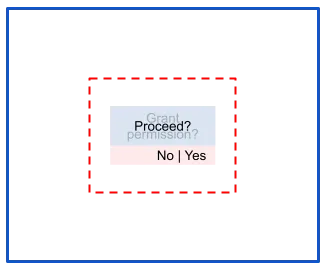
In this image you can see how overlay (blue) pretending to wait for user interaction to continue actually hides a permission dialog (red).
Tapjacking is used by all types of malware: adWare, info-stealers, trojans, etc. On Android there are 3 ways of protection/ detection and 1 way that is impossible to counteract. Let’s dive deeper then to see what options we have as developers.
Hide overlay windows
Android 12 introduced a new permission
<uses-permission android:name="android.permission.HIDE_OVERLAY_WINDOWS"/>This effectively blocks all the apps that create overlays through “Display over other apps” setting.
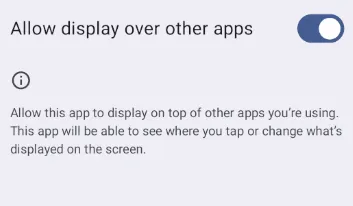
To use it simply put a check if your user is on android 12 or higher and set enforcing your app over overlays.
  if (Build.VERSION.SDK_INT >= Build.VERSION_CODES.S) {
            val activity = activityBinding?.activity ?: return
            activity.window.setHideOverlayWindows(true)
        }
Block touches through overlays into your app
According to apilevels.com almost 30% of all Android users are still using devices below Android 12. The closest thing to removing overlays from displaying over your app is to block all taps coming through overlays.
You can achieve this by using
 val activity = activityBinding?.activity ?: return
        val rootView = activity.findViewById<View>(android.R.id.content)?.rootView
        rootView?.filterTouchesWhenObscured = true
Just observe suspicious touches
You can also not block anything and have a more conservative approach by just detecting taps coming through overlays. This, combined with other behavioral analysis systems in place can help keep your customers safe while not blocking or removing overlays completely.
You need to set up your activity observer to monitor all tap down events — touches.
  val activity = activityBinding?.activity ?: return
        val originalCallback = activity.window.callback
        activity.window.callback = object : Window.Callback by originalCallback {
            override fun dispatchTouchEvent(event: MotionEvent): Boolean {
                if (event.action == MotionEvent.ACTION_DOWN) {
                    if (event.flags and MotionEvent.FLAG_WINDOW_IS_OBSCURED != 0) {
                        touchEvents?.success("Obscured touch detected at: ${System.currentTimeMillis()}")
                    }
                    if (Build.VERSION.SDK_INT >= Build.VERSION_CODES.Q &&
                        event.flags and MotionEvent.FLAG_WINDOW_IS_PARTIALLY_OBSCURED != 0
                    ) {
                        touchEvents?.success("Partially obscured touch detected at: ${System.currentTimeMillis()}")
                    }
                }
                return originalCallback.dispatchTouchEvent(event)
            }
        }
With this code depending on Android version you will be able to just detect touches through overlay or go even more granular into detecting touches with full screen overlays or ones coming through partial overlays.
Full Kotlin sample available here — https://github.com/RelappsStudio/fraud_protection/blob/main/android/src/main/kotlin/com/relapps/fraud_protection/FraudProtectionPlugin.kt
It’s part of my Flutter plugin that focuses on tackling the issues discussed here. More details about it at the bottom of the article.
The devil in the details
There is still a big problem regarding overlays. There is a way to make them not-observable, not-overridable and not-blockable. Granted, it depends heavily on unaware users giving malware elevated system access. Nevertheless this is something we should be taking into consideration.
Accessibility service abuse
When talking about accessibility service we’re automatically walking a tightrope. On one hand we have to consider the needs of people who depend on these services to be able to use their devices. On the other hand it gives apps most unrestricted control over your system.
Why accessibility can be dangerous
Many types of malware will pretend that it’s no big deal and they only need this access to work correctly. Especially trojans pretending to be useful tools such as remote connection bridges or anti-virus apps.
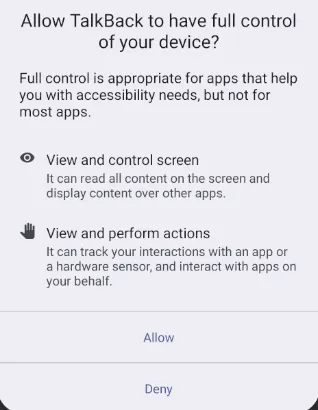
When an application is granted to run an accessibility service it’s pretty much game over. As you can see, these services can actively see what is happening on the screen at all times. They interact with other apps without user input.
When it comes to overlays — the ones created by accessibility service cannot be blocked or observed by any means shown above. They are created and treated by the system in a completely different way than a standard “display over other apps” overlay.
The only line of defense
Here the only way a developer can navigate this situation is by observing accessibility services running on device. Luckily enough we can do this without needing any special permission.
// context is ApplicationContext
 val accessibilityManager =
            context.getSystemService(Context.ACCESSIBILITY_SERVICE) as AccessibilityManager
        val enabledServices =
            accessibilityManager.getEnabledAccessibilityServiceList(FEEDBACK_ALL_MASK)
        var activeServicesFound = emptyList<String>()
        for (serviceInfo in enabledServices) {
            activeServicesFound += serviceInfo.id
        }
        return activeServicesFound
Or you can directly pass a list of blacklisted services and check if any are present on device.
// returns true/false if a blacklisted service has been found
// the search mimics 'wildcard' notation, all package names must end with '*'
val accessibilityManager =
            applicationContext.getSystemService(Context.ACCESSIBILITY_SERVICE) as AccessibilityManager
        val enabledPackages = accessibilityManager
            .getEnabledAccessibilityServiceList(FEEDBACK_ALL_MASK)
            .map { it.resolveInfo.serviceInfo.packageName }
        return enabledPackages.any { pkg ->
            blacklist.any { entry ->
                entry.endsWith("*") && pkg.startsWith(entry.removeSuffix("*")) || pkg == entry
            }
        }
When it comes to accessibility service all we can do is monitor and advice. We can check if a potentially malicious service is active on device and report to user that they have to disable it to continue. For their own safety.
Walking on thin ice
Of course such actions have to be made ONLY after a thorough research into actual accessibility services that have nothing to do with viruses. Good examples would be password vaults or various sleep monitoring apps that require their own services to provide full features.
That is also why I am recommending blacklisting based on possible virus package names instead of whitelisting which could impact actual service helping someone in their day to day lives by accidentally excluding a non-malicious app.
After exploring the possible exploits and protections around overlays and accessibility there’s still one question left.
Is basic security really pointless?
In a way — yes… and no. While it is valid to detect less aggressive malware or malicious actors, I’ve come to found that with a rooted device not much actually matters.
With root privileges and enough willpower you are able to mimic non-rooted device. Able to pretend you’re not spoofing your current location. Though, I have to admit, it is getting harder with new Android releases and maybe someday will be completely impossible.
These checks might give you a tiny advantage in recognizing early signs of tampering but they definitely should not fool you into a false sense of security that you have a couple of if statements when app initializes which means your users or your product is completely safe.
You are not alone
This post is not sponsored but security is an incredibly important part of app development so I wanted to have a corner for recommendations of tools that you can use alongside your custom security logic.
- Play Integrity API — helps you check that user actions and server requests are coming from your genuine app, installed by Google Play, running on a genuine Android-powered device. Moreover it can verify: — if device has latest security update — if there is risk from apps abusing overlay permission or accessibility permissions — if there is known malware installed
- Threatmark — various checks including behavioral profiling and bot detection. Assessing the probability of requests being sent by a human and being genuine activity performed by the owner of the account.
- Appdome — preventing fraud, ATOs, bot attacks, API abuse, deepfakes, and other identity-based threats
If you’re using Flutter, you’re in for a treat
I’ve recently prepared a free, open source package to deal with the topics we talked about today — fraud_protection. With this package you can:
- detect touches coming through overlays
- detect what accessibility services are running
- use pre-screened blacklist to compare if there are malicious services present on system (yes, you can add your own ;) )
- force your app on top of overlay apps
- block touches coming through overlays into your app
- check if there is any admin/kiosk app present on device
All in an easy to use, static approach. See examples below
// Hide malicious overlay windows (Android 12+)
// Forces your application on top of any potential overlay
await FraudProtection.setHideOverlayWindows(true);
// Block touches if app is obscured by overlays
await FraudProtection.setBlockOverlayTouches(true);
// Get active accessibility services
final activeServices = await FraudProtection.getActiveAccessibilityServices();
// Check active services against a customizable blacklist
// You can expand it with your own packages
// It is appreciated to make PR to package repo to add your package to baseline.
 await FraudProtection.isAnyAccessibilityServiceBlacklisted(
  FraudProtection.DEFAULT_ACCESSIBILITY_BLACKLIST + ["com.malware.*",
  "com.fakebank.*",
] );
// Listen if a touch through overlay has been made
FraudProtection.touchEvents.listen((event) {
  // Handle obscured touch event
  print("Overlay touch event detected: $event");
});
Thank you
For reading another one of my articles. I’ll return once I find more curiosities related to mobile development or if I write another tool to explain why it exists in a way-too-long article ;)
If you liked this one or just like deep technical dives into niche mobile-related topics check out my other articles.